
Connect your Fireflies.ai account to Brevity to automatically import your meeting recordings for scoring, deal analytics, and coaching insights — without adding a second bot to your calls.
What You'll Need
- An active Fireflies.ai account on a Business or Enterprise plan (Free and Pro plans are not supported due to API limitations)
- Admin access to your Fireflies account to generate an API key
- A Brevity user account
What Happens When You Connect
Once connected, Brevity automatically syncs your Fireflies recordings and applies the same scoring and analytics as Brevity-recorded meetings. Here's what to expect:
- Automatic sync — New Fireflies recordings appear in Brevity within approximately 15 minutes of Fireflies finishing its analysis.
- 90-day backfill — On first connection, Brevity imports up to 90 days of your existing Fireflies recordings automatically.
- Full Brevity analytics — Talk time, objection handling, deal risk, coaching signals, and all other Brevity analytics run on Fireflies meetings the same way they run on Brevity-recorded meetings.
- Named speaker identification — For meetings recorded via Google Meet or Zoom, Fireflies provides named speakers that map to Brevity contacts. Meetings recorded on Microsoft Teams or Webex will show speakers as "Speaker 1," "Speaker 2," etc.
- Source badges — Fireflies-imported meetings display a Fireflies badge in your meeting library so you can easily tell them apart from Brevity-recorded meetings.
- Deduplication — If both the Brevity notetaker and Fireflies capture the same call, Brevity prevents the meeting from appearing twice.
How to Connect Your Fireflies Account
Each user connects their own Fireflies account individually. No IT involvement is required.
- In Brevity, go to Settings → Connections in the sidebar.
- Find the Fireflies card and click Set up.
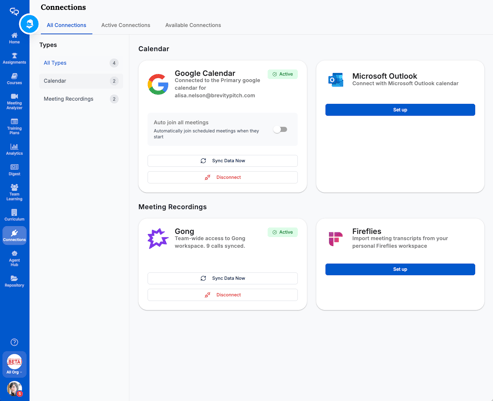
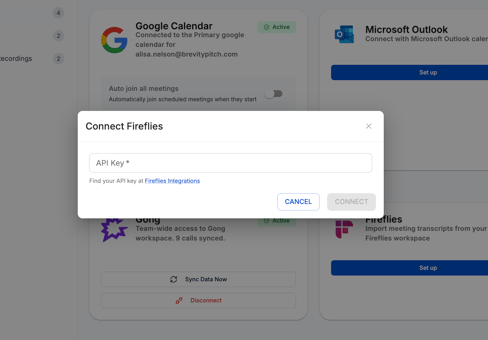
- The connection wizard opens you will see a text box asking for your API key.
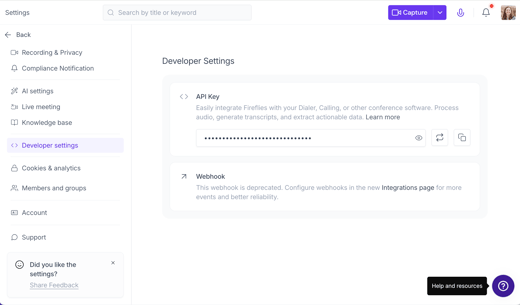
- In a separate tab, open your Fireflies account and go to Settings → Developer Settings → API. Copy your API key.
- Paste the API key into Brevity. A green checkmark confirms the key is valid. If you see a red error, check that you copied the full key without extra spaces and that your Fireflies plan is Business or Enterprise.
- Click Connect. Brevity registers a webhook with Fireflies and confirms the connection.
- Your 90-day backfill begins automatically in the background. You can track progress on the Integrations page. Once complete, all historical meetings appear in your meeting library.
From this point forward, new Fireflies recordings sync automatically. No further action is needed.
Good to Know
Individual connections only — Each user connects their own Fireflies account. There is no admin-level bulk connection at this time.
Microsoft Teams and Webex recordings — Transcripts, scoring, and deal analytics all work, but speakers appear as generic labels (Speaker 1, Speaker 2) rather than named participants. Named speakers are available for Google Meet and Zoom recordings only.
Backfill window — Only recordings from the last 90 days at the time of connection are imported. Older recordings are not included.
Troubleshooting
API key validation fails
Check that there are no extra spaces before or after the key. Confirm your Fireflies plan is Business or Enterprise by going to Fireflies → Settings → API. If the key was recently regenerated, make sure you're using the new one.
Backfill seems stuck
Large meeting libraries (100+ meetings) can take 4–6 hours to fully import. If the status shows an error after several hours, disconnect and reconnect your Fireflies account to restart the backfill.
New meetings aren't appearing
Fireflies needs to finish processing a recording before Brevity can import it. Allow up to 30 minutes after Fireflies sends its completion notification. If meetings still don't appear, check the Integrations page to confirm your connection is active. Brevity also runs a background check every 6 hours as a safety net.
A meeting appears twice
If both the Brevity notetaker and Fireflies captured the same call, contact Brevity Support with the meeting date and title so we can merge the duplicates.