
We’re currently transitioning our admin model from Team > Group to Organization > Team > Group, with admin roles becoming Organization Admin and Team Admin. As a result, some language in this article (for example, references to “Team” or “Group”) may not exactly match what you see in the product today. The underlying functionality described here remains the same, even if the labels and hierarchy in your app look slightly different while we complete this transition.
Viewing Access Logs
The access logs allow you to monitor activity within your Brevity team, including the history of logins, logouts, active periods, and role changes for all team members.
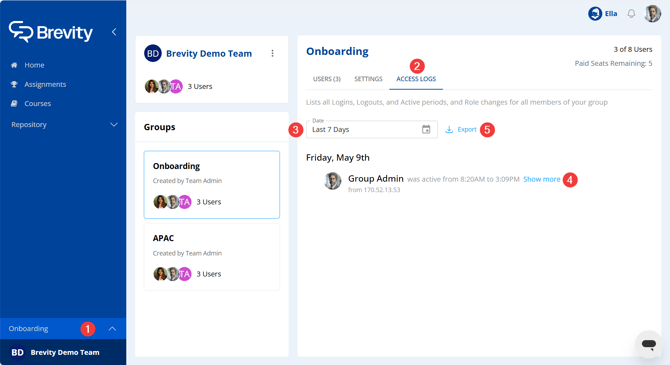
- Access the team configuration page. Click your company's logo in the bottom-left of the Brevity window, and ensure that All Organization is selected.
- Access the Access Logs tab.
- To change the timeframe for information returned, enter a date range in the Date field.
- To expand or collapse an entry, click Show more or Show less.
- To export the access logs with the current settings applied to a .csv file, click Export.