
What is Brevity Phone-Based Role Play?
Brevity phone-based role plays allow you to practice Brevity assignments over the phone whenever and wherever. Long car ride between meetings? Want to prepare in the parking lot before an appointment? With Brevity phone-based role plays, you can use a text message menu to schedule and select a Brevity role play, then when it's time to practice, you will receive a call from your Brevity AI persona to complete the role play. After your role play, feedback and coaching are delivered immediately via text message.
What do I need to do to turn it on?
To take advantage of Brevity phone-based role play, follow these steps to verify your phone number in Brevity.
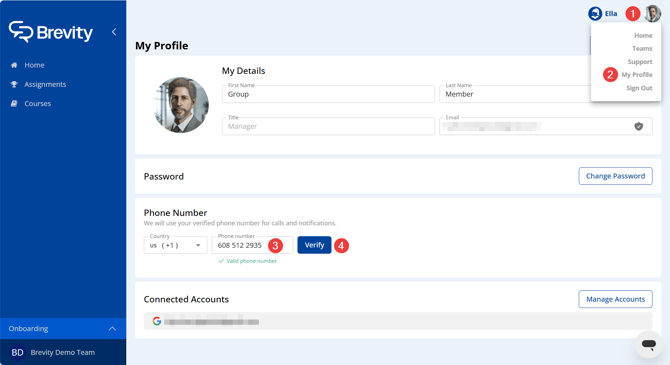
- Click your account icon in the top-right corner of the Brevity window.
- Click My Profile.
- In the Phone Number section, enter your cell phone number.
- Click Verify. The Verify your phone number window appears.
- Check the box to consent to receive automated messages and calls from Brevity.
- Click Call me or Text me to choose a verification method.
- Follow the prompts in the automated call or text to finish verifying your phone number.
How do I use it?
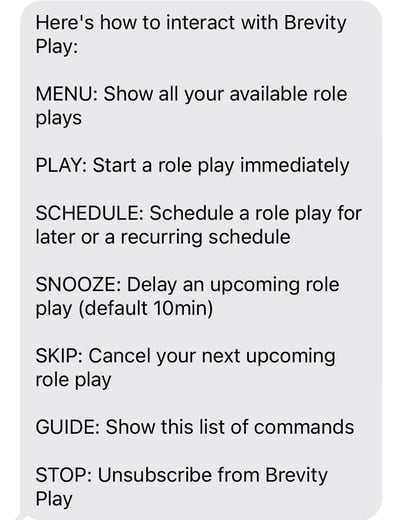
Once your phone number is verified and Brevity phone-based role play is launched for your organization, you will receive a welcome text message. Text MENU to see a list of available role plays. Text SCHEDULE to schedule a role play session for a future time. For a full list of options, refer to this article.
How can I provide feedback?
As an early adopter of Brevity phone-based role plays, your feedback is critical as we plan the future of Brevity. Please send any feedback to support@brevitypitch.com