Skip to content
  • There are no suggestions because the search field is empty.

Cloning and Editing a Persona

Cloning and editing an existing AI persona

Editing the Description

Update the Description when you need to change who the persona fundamentally is — their role, background, dominant communication style, or general disposition. This is the right place for broad behavioral traits that should show up in every conversation.

Editing Persona Attributes

Attributes are the most targeted way to adjust behavior. Add a new attribute when you need to introduce or strengthen a specific behavior. Edit an existing one when the AI is doing something close to right but not quite. Delete one when a behavior is getting in the way.

To add or edit an attribute, click an existing attribute to open it for editing, or hover between attributes and click + Add New. Save the attribute, then click Save Persona.

To reorder attributes, drag them using the handle on the right. Attributes listed first tend to have the most influence on the AI's behavior.

Editing Voice Settings

Update voice, accent, and voice instructions when the current voice doesn't match the persona's geography or character, or when you want to adjust pacing and tone. Voice changes do not affect what the persona says — only how it sounds.

Tip: If you want to test changes without affecting other courses or users, clone the persona first.


Common Problems and How to Fix Them

"The persona is too easy — they aren't pushing back enough"

The persona may not have specific enough resistance behaviors. Rather than rewriting the Description, add Persona Attributes that define exactly how and when they push back.

Try adding attributes like:

  • "Skeptical of bold claims — will ask for proof before engaging further"
  • "Rarely commits to next steps in a first conversation"
  • "Has been burned by vendor promises before and tests for credibility early"
  • "Juggling several competing priorities and won't give a vendor full attention until they've earned it"
  • "Asks hard questions about implementation and total cost — not just the pitch"

For a harder conversation (not a harder personality), add situational pressure in the Context's AI Instructions instead. See: [Cloning & Editing a Context].


"The persona won't answer discovery questions about their situation"

If the AI gives vague or evasive answers to questions like "What are you currently using?" or "How does your team handle this today?", it's because that information isn't in the persona. The AI can only share what you've given it.

Add attributes that spell out the persona's current situation:

  • "Currently using [tool or process] for [function] — it was put in place two years ago"
  • "Team of 12 handles [X] manually, using spreadsheets and disconnected tools"
  • "Has evaluated two other vendors in the past year, but neither moved forward"
  • "Budget for this area resets in Q2"

For financial services personas, also include: current product holdings or coverage, length of the existing advisor relationship, and any relevant life events (retirement planning, business sale, policy renewal).

The more specific the information, the more naturally the persona can answer discovery questions.


"They keep demanding hard data, but that's not how our buyer actually behaves"

Look in the Description for language like "data-driven," "analytical," or "needs proof before deciding." Check the Attributes for anything that reinforces this pattern. Modify or remove those, and replace them with attributes that match how your buyer actually makes decisions.

Try:

  • "Makes decisions based on instinct, peer recommendations, and fit — not detailed ROI analysis"
  • "Trusts vendors who show industry knowledge more than those who lead with statistics"
  • "Comfortable moving forward if the relationship feels right and the business case makes sense at a high level"
  • "Prefers relevant customer stories over formal case studies"

This is especially common for financial services personas, where trust and relationships drive decisions more than data.


"The persona agrees with everything — reps aren't being challenged"

When the persona is too agreeable, it's usually because the Attributes are too positive or too sparse. The AI defaults toward being cooperative unless it has specific instructions to resist.

Try adding:

  • "Needs to feel heard before showing genuine interest — doesn't open up easily"
  • "Will redirect any conversation that feels like a pitch rather than a dialogue"
  • "Guards her time and disengages quickly from conversations that don't feel relevant"
  • "Reserved with new vendors — warms up slowly over the course of a call"
  • "Asks early: 'Why does this matter to me specifically?'"

For gatekeeper personas, make the protective role explicit:

  • "Her job is to screen vendors and protect the decision-maker's time — she is not the buyer"
  • "Will not pass a vendor through unless they can give a clear, plain-language reason why"
  • "Asks for written materials before agreeing to any next step"

"They always object to price and nothing moves them"

This usually means a price-related attribute is written as a permanent block rather than a realistic resistance. Review the Attributes for anything like "always focused on cost" or "won't engage if pricing is above X," and rewrite it to include a condition under which the persona can open up.

Replace hard blocks with conditional resistance:

  • Instead of: "Budget is limited and price is always the primary concern"
  • Try: "Budget is tight this year, but open to making the case to leadership if the ROI is clear"

Add attributes that give the rep a way through:

  • "Will reconsider cost objections if the vendor can show ROI in terms that matter to her"
  • "Has approved spend above initial budget before when she felt confident in the vendor and the outcome"
  • "Responds well to total-cost-of-inaction conversations"

For manufacturing personas where large purchases need multiple approvals:

  • "Doesn't have final authority on spend above a certain threshold — needs to bring leadership a strong recommendation first"
  • "Can move fast on decisions within her authority, but larger purchases require a formal business case"

Quick Reference

What you're seeing Where to look What to do
Too easy, no real pushback Persona Attributes Add specific resistance and friction attributes
Vague answers to discovery questions Description + Attributes Add explicit current-state details
Unrealistic demands for data and proof Description + Attributes Remove or soften analytical language
Too agreeable, no challenge Persona Attributes Add resistance patterns
Stuck on price, won't open up Persona Attributes Replace absolute blocks with conditional resistance
Doesn't feel like your actual buyer Description Rewrite to reflect real role, pressures, and communication style
Hard situation (not hard personality) Context → AI Instructions Add situational friction there instead

Related Articles

  • [Cloning & Editing a Context]
  • [Understanding Your Auto-Generated Milestones (and How to Make Them Your Own)]
  • [How to Write Milestones Your Reps — and the AI — Will Understand]
  • [Creating a Persona From Scratch]

What a Persona Does

A persona defines who the AI is in a practice conversation — their personality, communication style, and how they respond to a rep. The Description and Persona Attributes are the two fields that control most of the AI's behavior. Everything else (voice, accent) controls how the persona sounds, not what they say.

Persona vs. Context — the key difference: Use the Persona to define who the AI always is. Use the Context's AI Instructions for what's happening in this specific conversation. For example, if you want the persona to always be skeptical, set that in the Persona. If you want them skeptical right now because they just had a bad experience with a competitor, set that in the AI Instructions.

See also: Editing a Context
The Persona Builder Fields

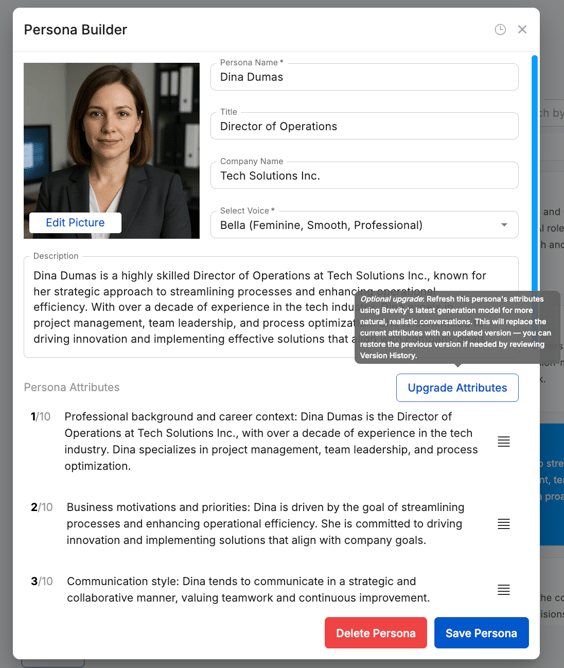
Name, Title, and Company Name — The persona's professional identity. A specific title matters: "VP of Operations at a mid-market manufacturing firm" behaves differently from "Director of IT."

Description — A short narrative describing who the persona is, how they communicate, and what they care about. Think of it as their professional background and personality rolled into one. Changes here affect every conversation that uses this persona.

Persona Attributes — Individual statements that shape specific behaviors — how they push back, what they ask about, what it takes for them to warm up. These are your most precise tool for adjusting the AI. You can add, edit, reorder, and delete them individually. Attributes listed first tend to have the most influence.

Voice — The voice the AI speaks in. You can preview options before saving. This does not affect what the persona says, only how it sounds.

Accent and Voice Instructions (OpenAI voices only) — Fine-tune regional accent and delivery style (pacing, tone, energy level). Use "Custom/Other" for a fully written accent description — note this may produce unpredictable results.

editpersona2


Cloning a Persona

You can clone an existing persona to create a copy that you can edit and manage separately from the original. This is useful when you want to create a variation — for example, cloning a persona and updating its Attributes to make the conversation style more challenging. You can then use both personas within the same course to give reps a range of experiences.

To clone a persona:

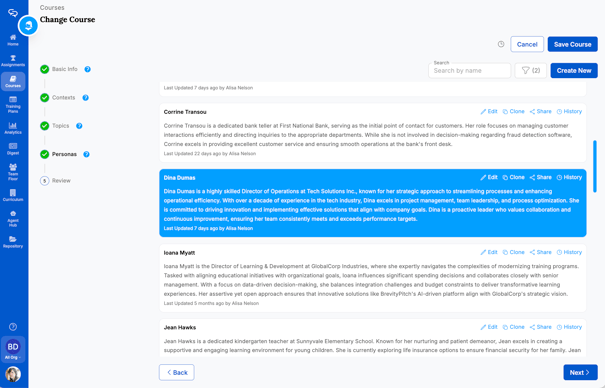
  1. Click a course from the Courses tab to enter the Change course workflow. From the Personas step, find the persona you want to clone and click Clone.
  2. Click Yes to confirm.

The cloned persona appears with "Copy of" prepended to the name. From here, you can edit, share, and manage it just like any other persona.


clonepersona

    Editing a Persona

    You can edit existing personas to update their name, work experience, conversation style, and more.

    Note: When you update a persona, any active assignments that include that persona will be updated automatically. Team admin and member users can only edit personas they created or personas shared with them with Editor privileges.

    To edit a persona:

    1. Click a course from the Courses tab to enter the Change course workflow. From the Personas step, find the persona you want to edit and click Edit.
    2. Make your changes in the Persona Builder. When finished, click Save Persona.

    For more information about editing personas and their relationship with courses and assignments, see: Creating a Course

    See below for guidance on what to change and when.

    editpersonas


    Editing the Description

    Update the Description when you need to change who the persona fundamentally is — their role, background, dominant communication style, or general disposition. This is the right place for broad behavioral traits that should show up in every conversation.

    Editing Persona Attributes

    Attributes are the most targeted way to adjust behavior. Add a new attribute when you need to introduce or strengthen a specific behavior. Edit an existing one when the AI is doing something close to right but not quite. Delete one when a behavior is getting in the way.

    To add or edit an attribute, click an existing attribute to open it for editing, or hover between attributes and click + Add New. Save the attribute, then click Save Persona.

    To reorder attributes, drag them using the handle on the right. Attributes listed first tend to have the most influence on the AI's behavior.

    Editing Voice Settings

    Update voice, accent, and voice instructions when the current voice doesn't match the persona's geography or character, or when you want to adjust pacing and tone. Voice changes do not affect what the persona says — only how it sounds.

    Tip: If you want to test changes without affecting other courses or users, clone the persona first.


    Common Problems and How to Fix Them

    "The persona is too easy — they aren't pushing back enough"

    The persona may not have specific enough resistance behaviors. Rather than rewriting the Description, add Persona Attributes that define exactly how and when they push back.

    Try adding attributes like:

    • "Skeptical of bold claims — will ask for proof before engaging further"
    • "Rarely commits to next steps in a first conversation"
    • "Has been burned by vendor promises before and tests for credibility early"
    • "Juggling several competing priorities and won't give a vendor full attention until they've earned it"
    • "Asks hard questions about implementation and total cost — not just the pitch"

    For a harder conversation (not a harder personality), add situational pressure in the Context's AI Instructions instead. See: [Cloning & Editing a Context].


    "The persona won't answer discovery questions about their situation"

    If the AI gives vague or evasive answers to questions like "What are you currently using?" or "How does your team handle this today?", it's because that information isn't in the persona. The AI can only share what you've given it.

    Add attributes that spell out the persona's current situation:

    • "Currently using [tool or process] for [function] — it was put in place two years ago"
    • "Team of 12 handles [X] manually, using spreadsheets and disconnected tools"
    • "Has evaluated two other vendors in the past year, but neither moved forward"
    • "Budget for this area resets in Q2"

    For financial services personas, also include: current product holdings or coverage, length of the existing advisor relationship, and any relevant life events (retirement planning, business sale, policy renewal).

    The more specific the information, the more naturally the persona can answer discovery questions.


    "They keep demanding hard data, but that's not how our buyer actually behaves"

    Look in the Description for language like "data-driven," "analytical," or "needs proof before deciding." Check the Attributes for anything that reinforces this pattern. Modify or remove those, and replace them with attributes that match how your buyer actually makes decisions.

    Try:

    • "Makes decisions based on instinct, peer recommendations, and fit — not detailed ROI analysis"
    • "Trusts vendors who show industry knowledge more than those who lead with statistics"
    • "Comfortable moving forward if the relationship feels right and the business case makes sense at a high level"
    • "Prefers relevant customer stories over formal case studies"

    This is especially common for financial services personas, where trust and relationships drive decisions more than data.


    "The persona agrees with everything — reps aren't being challenged"

    When the persona is too agreeable, it's usually because the Attributes are too positive or too sparse. The AI defaults toward being cooperative unless it has specific instructions to resist.

    Try adding:

    • "Needs to feel heard before showing genuine interest — doesn't open up easily"
    • "Will redirect any conversation that feels like a pitch rather than a dialogue"
    • "Guards her time and disengages quickly from conversations that don't feel relevant"
    • "Reserved with new vendors — warms up slowly over the course of a call"
    • "Asks early: 'Why does this matter to me specifically?'"

    For gatekeeper personas, make the protective role explicit:

    • "Her job is to screen vendors and protect the decision-maker's time — she is not the buyer"
    • "Will not pass a vendor through unless they can give a clear, plain-language reason why"
    • "Asks for written materials before agreeing to any next step"

    "They always object to price and nothing moves them"

    This usually means a price-related attribute is written as a permanent block rather than a realistic resistance. Review the Attributes for anything like "always focused on cost" or "won't engage if pricing is above X," and rewrite it to include a condition under which the persona can open up.

    Replace hard blocks with conditional resistance:

    • Instead of: "Budget is limited and price is always the primary concern"
    • Try: "Budget is tight this year, but open to making the case to leadership if the ROI is clear"

    Add attributes that give the rep a way through:

    • "Will reconsider cost objections if the vendor can show ROI in terms that matter to her"
    • "Has approved spend above initial budget before when she felt confident in the vendor and the outcome"
    • "Responds well to total-cost-of-inaction conversations"

    For manufacturing personas where large purchases need multiple approvals:

    • "Doesn't have final authority on spend above a certain threshold — needs to bring leadership a strong recommendation first"
    • "Can move fast on decisions within her authority, but larger purchases require a formal business case"

    Quick Reference

    What you're seeing Where to look What to do
    Too easy, no real pushback Persona Attributes Add specific resistance and friction attributes
    Vague answers to discovery questions Description + Attributes Add explicit current-state details
    Unrealistic demands for data and proof Description + Attributes Remove or soften analytical language
    Too agreeable, no challenge Persona Attributes Add resistance patterns
    Stuck on price, won't open up Persona Attributes Replace absolute blocks with conditional resistance
    Doesn't feel like your actual buyer Description Rewrite to reflect real role, pressures, and communication style
    Hard situation (not hard personality) Context → AI Instructions Add situational friction there instead

    Related Articles