
Overview
Brevity phone-based role plays allow you to practice Brevity assignments over the phone whenever and wherever. Once enabled by your Brevity administrator, you can use your cell phone to manage and complete any assigned Brevity role plays.
Prerequisites
In order to use Brevity phone-based role plays, you first need to verify your phone number. You can do this from the My Profile page in Brevity.
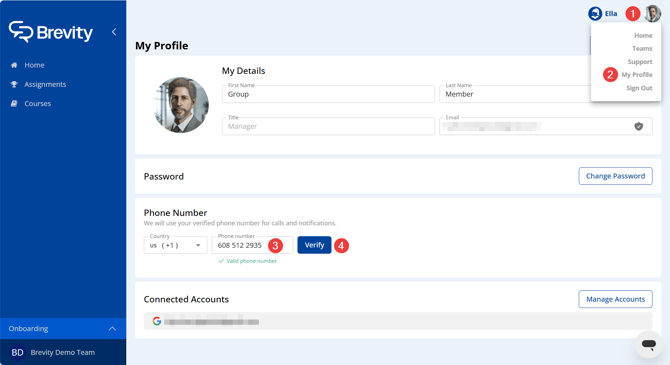
- Click your account icon in the top-right corner of the Brevity window.
- Click My Profile.
- In the Phone Number section, enter your cell phone number.
- Click Verify. The Verify your phone number window appears.
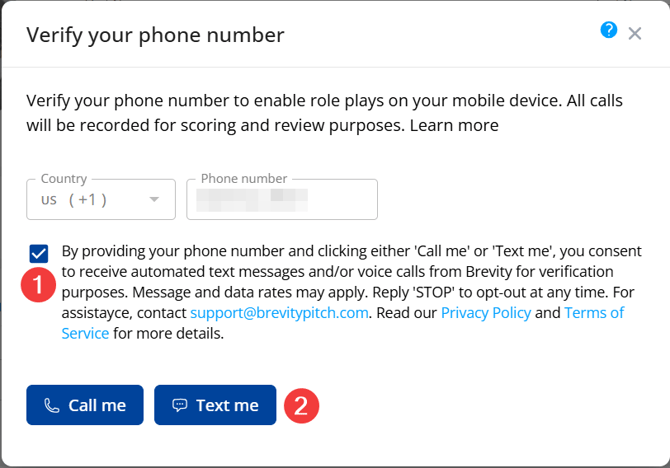
- Check the box to consent to receive automated messages and calls from Brevity.
- Click Call me or Text me to choose a verification method.
- Follow the prompts in the automated call or text to finish verifying your phone number.
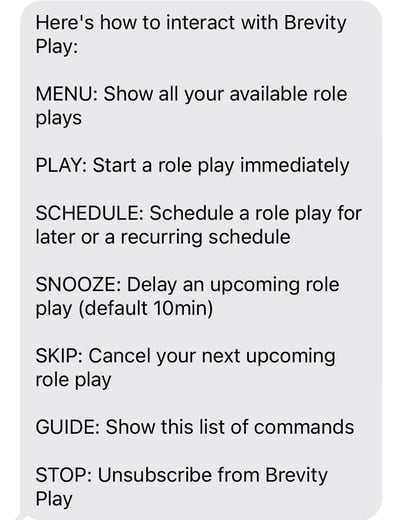
The Brevity Phone-Based Role Play Menu
Once your phone number is verified, you will receive a text message (SMS) from Brevity with instructions for managing your phone-based role play assignments.
SMS messages from Brevity will be delivered from the phone number +1 (218) 296-9448. If you are not receiving Brevity SMS messages, add this phone number to your contacts to prevent these messages from being blocked automatically.
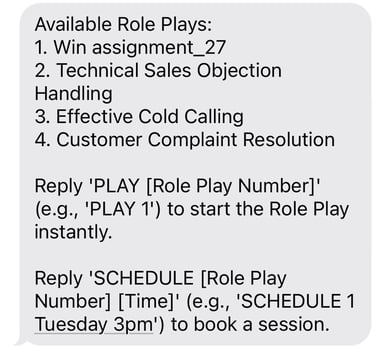
Selecting a Phone-Based Role Play
Text "MENU" to see a list of available phone-based role plays.
Practicing a Phone-Based Role Play
To practice an available role play, text "PLAY [Role Play Number]," where the role play number refers to the specific role play you want to practice. For example, in the screenshot above, text "PLAY 2" to practice the Technical Sales Objection Handling role play.
After selecting a role play, you will receive a text with instructions specific to that role play. This SMS message includes information about the role play conversation, as well as instructions for delaying the call.
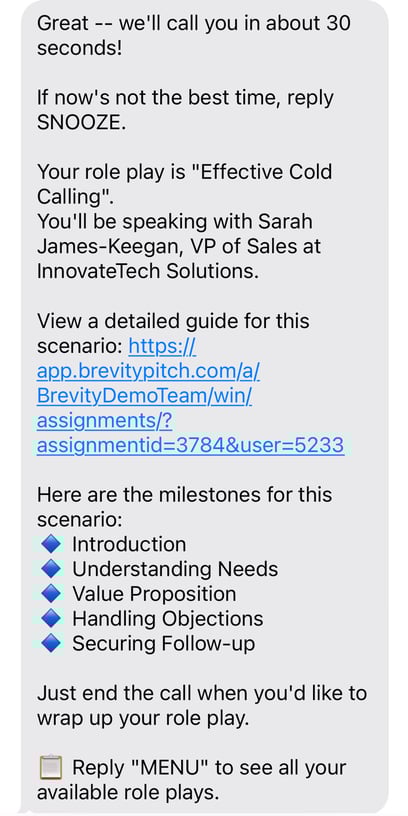
Approximately 30 seconds after selecting a role play, you will receive a phone call from Brevity. Simply begin speaking to start the role play conversation. When you are finished with the role play, hang up.
Phone-Based Role Play Feedback
After you complete a phone-based role play, you will receive an SMS message that includes feedback related to the conversation. This feedback includes information about your milestone progress as well as Start/Stop/Continue recommendations. You can click the link in the feedback SMS to log in to Brevity and see more detailed feedback. All phone-based role plays are available to review in the desktop version of Brevity.
Scheduling a Phone-Based Role Play
You can schedule a phone-based role play up to one week in advance. This is a great way to reserve practice time for an upcoming meeting or conversation. To schedule a phone-based role play, text "SCHEDULE [Role Play Number] [Day and Time]." For example, you might text "SCHEDULE 2 Friday 2 PM" to schedule your second available role play for the next upcoming Friday at 2 PM your local time. At that time, you will receive a phone call from Brevity to practice the role play.
If you are encountering issues with scheduling, try adding time zone information to your scheduling SMS message. For example:
- Schedule [Role Play Number] [Day] [Month] [Date] at [Time] [Time Zone]
- "Schedule 1 Monday June 1 at 3:00 PM Eastern"
Delay an Upcoming Phone-Based Role Play
To delay your next upcoming phone-based role play, text "SNOOZE." By default, this delays the upcoming role play by 10 minutes. You can delay by a specific amount of time by texting "SNOOZE [Role Play Number] [Minutes/Hours]." For example, you could text "SNOOZE 1 3 HOURS" to delay your next upcoming role play by three hours.
Cancel an Upcoming Phone-Based Role Play
To cancel your next upcoming phone-based role play, text "SKIP."
Unsubscribe from Brevity Phone-Based Role Plays
Text "STOP" to unsubscribe from Brevity phone-based role plays.
Reviewing Scores and Feedback
After completing a phone-based role play, your conversations are saved and accessible alongside any conversations you record via the web app. Simply navigate to the Assignments tab on your mobile or desktop device, find the assignment you practiced over the phone, and review your transcript, scores, and feedback.
On the score report page, you will see your historical record of conversations completed for that assignment, those recorded on the web app will show a computer icon while those recorded using phone-based role play will have a phone icon.