
Brevity's interface now runs fully in Hebrew — including right-to-left layout — and Canadian French. Everything from building a role play to assigning it to practicing it appears in your language, and the AI's coaching comes back in your language too. This article explains how Brevity picks your language, how to change it, and what is (and isn't) translated.
Overview
Until now, Brevity could hold a role-play conversation in many languages, but the product around it — buttons, menus, wizards — was English only. Now the full experience is available in Hebrew and Canadian French: creating role plays (the Course Builder), assigning them, doing them (the practice flow), and the everyday screens like navigation, login, and your profile.
Language is set per person. Each user sees their own choice — a manager can stay in English while their team works in Hebrew or French. There's nothing an admin has to switch on and no setup for your organization; it's self-serve for every user.
How Brevity chooses your language
Brevity is browser-aware:
- On first login, Brevity reads your browser's language and applies it automatically. If your browser is set to Hebrew, you land in a Hebrew, right-to-left Brevity without touching a setting; if it's set to Canadian French, you land in French.
- If your browser is set to a language Brevity doesn't offer yet, Brevity falls back to English and works normally.
Changing your language yourself
You can override the automatic choice at any time:
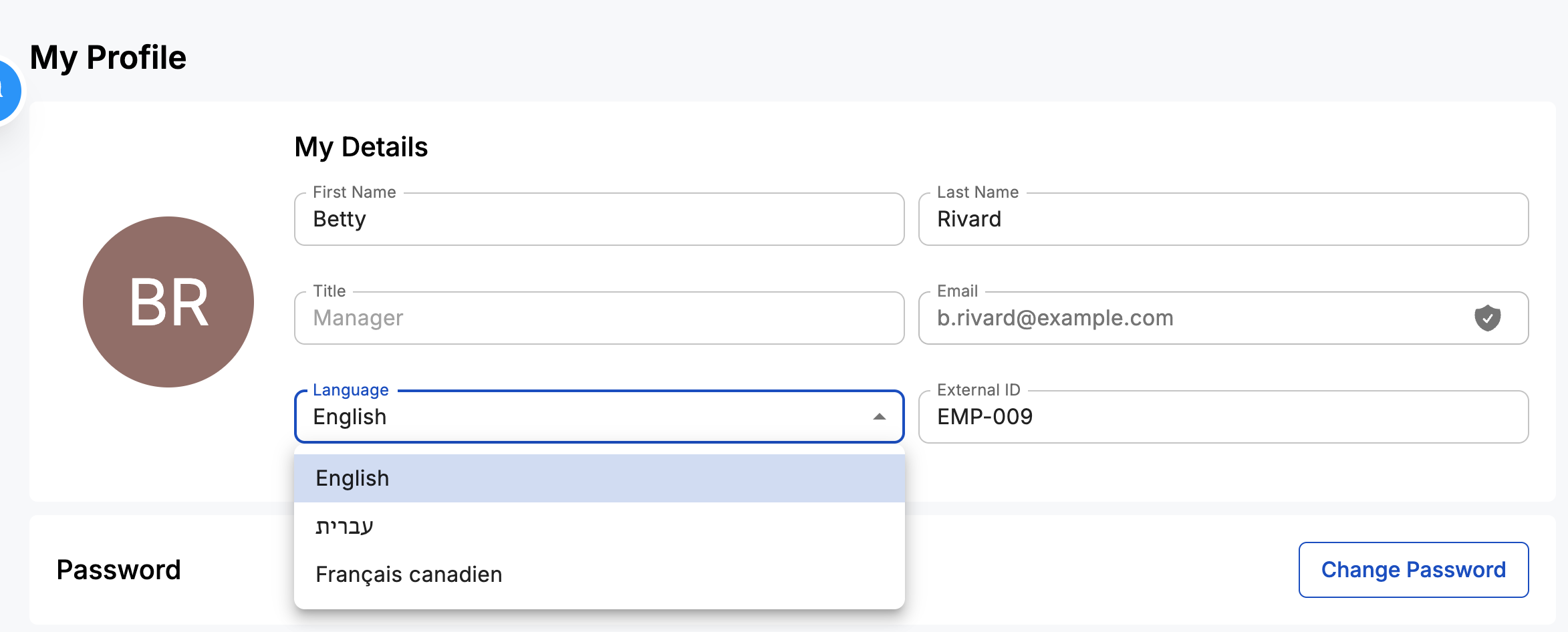
- Open your Profile.
- Find the language selector.
- Choose your language.
Your explicit choice persists and re-applies every time you reload — and from then on it takes precedence over browser detection.
What's translated
- The full interface in Hebrew and Canadian French — the entire Course Builder wizard (basic info, contexts, topics, personas, review), the assignment flows, the complete practice flow, plus navigation, login, and profile.
- AI-generated content in your language — scenarios, personas, milestones, and coaching feedback are auto-translated with a one-tap opt-in. When you create content in Hebrew or Canadian French, Brevity generates it in that language natively.
Right-to-left, done properly (Hebrew)
Hebrew isn't just different words — the whole page mirrors. Navigation moves to the right, "Next" buttons sit on the left, and directional icons and progress flow reverse. Mixed text is handled too: a Hebrew sentence containing an English company name or a phone number displays each part in the correct direction automatically.
UI language vs. conversation language
These are two different things:
- Conversation language is what the AI persona speaks and understands during a role play. Brevity has supported many conversation languages for a while.
- UI language is the interface around the conversation — the screens that guide you to and through the practice. That's what's new here.
A learner in Montreal could already practice a role play in French; now the screens guiding them there are in French too.
Note also that we ship Canadian French (fr-CA) specifically — vocabulary and date formats reflect Canadian, not France, conventions.
What isn't translated yet
- Other interface languages. Hebrew and Canadian French are the two available today.
- Emails and notifications remain in English for now.
- Role-play transcripts are not translated — worth knowing if you review a teammate's role play that was spoken in a different language.
FAQ
How do I switch my language?
Usually you don't have to — Brevity detects your browser's language on first login and applies it. To change it, go to Profile → language selector; that choice sticks and takes precedence from then on.
Does my whole organization have to turn this on?
No. It's self-serve, per user — no org setting and no action needed from an admin.
What if my browser is set to a language Brevity doesn't offer?
Brevity falls back to English and works normally.
Will my manager see Hebrew or French too?
Only if they choose it. Language is per user — each person sees their own choice.
Do role-play conversations work in these languages?
Yes — conversations have supported many languages already. This update is about the interface around them.
Do emails arrive in my language?
Not yet — emails and notifications are still in English.
Need help? Reach out to your Customer Success Manager.